
What is IPAF’s ePAL?
Is IPAF’s ePAL Important to you
The ePAL app is a modern and efficient digital alternative to the traditional plastic PAL Card, developed by the International Powered Access Federation (IPAF). At Safe Training Services, we recognise the value of embracing digitalisation to enhance safety, convenience, and sustainability for our operators. If you are undertaking one of our IPAF training courses, you’ll now have the option to access your qualifications directly through the ePAL app.
Key Features of the IPAF ePAL App
The ePAL app is more than just a digital wallet – it’s a versatile tool for operators, employers, and training centres alike. Here’s what it offers:
- Digital PAL Card
Replace your plastic PAL Card with a digital version. It serves as proof of your competence for operating Mobile Elevating Work Platforms (MEWPs), Mast Climbing Work Platforms (MCWPs), and Construction Hoists (CHs). - Digital Logbook
Record and track your hands-on experience with various powered access machines. This helps operators maintain accurate operating logs and demonstrate their skills over time. - Safety Guides
Instantly access operator manuals and critical site safety guides directly through the app – a vital resource for maintaining safety standards on the job. - Pre-Use Checks
Carry out guided and non-guided MEWP pre-use checks. These checks can be recorded and shared instantly, ensuring your equipment is safe to use before operation begins. - Accident Reporting
Report accidents and near misses quickly and anonymously. This feature enhances workplace safety while contributing to industry-wide improvements.
How to Obtain IPAF’s ePAL
To get started with the ePAL app and your digital PAL Card, follow these steps: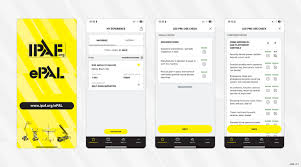
- Book an IPAF Training Course
Enrol on one of our IPAF-approved training courses at Safe Training Services. We offer comprehensive operator training for MEWPs, MCWPs, and CHs. - Complete Your Training
Successfully pass both the theoretical and practical elements of the IPAF training course. - Download the App
Once certified, download the IPAF ePAL app from the Apple App Store or Google Play. - Access Your Digital PAL Card
Log in to the app to view and share your new IPAF qualifications instantly.
Who Can Use the IPAF ePAL App?
The ePAL app is designed for various users:
- Operators
Store qualifications, log operating hours, and access safety resources wherever you are. - Employers
Quickly verify your team’s IPAF certifications to ensure compliance with safety standards on site. - Training Centres
Issue digital PAL Cards and provide instant access to operator credentials.
When Should You Use IPAF’s ePAL?
The app is invaluable for:
- Starting work on a new site
Prove your qualifications without hassle by sharing your digital PAL Card. - Performing pre-use safety checks
Carry out and log critical MEWP inspections directly through the app. - Logging experience
Record operating hours to build an accurate digital logbook of your skills. - Accessing safety guides
Get on-the-go access to IPAF’s comprehensive safety guidance, ensuring best practices at all times.

Why Train with Safe Training Services?
At Safe Training Services, we deliver IPAF-accredited training designed to ensure operators are fully competent, safe, and confident in using powered access equipment.
Our IPAF Training Courses
- IPAF Operator Training: Covers MEWPs, MCWPs, and CHs.
- MEWPs for Managers: Ideal for supervisors and managers overseeing MEWP operations.
- Competent Assessed Persons (CAP): Advanced training for those responsible for equipment inspections and maintenance.
Why Choose Us?
- Fully Certified Training Centre: Approved by IPAF to deliver high-quality courses.
- Experienced Instructors: Our trainers bring years of practical industry knowledge to every session.
- Convenient Training Options: Courses tailored to fit your needs, whether you’re an individual operator or part of a team.
Embrace Digital Convenience with ePAL
The introduction of the ePAL app highlights IPAF’s commitment to modernising the powered access industry. For operators, employers, and training providers, this digital transformation simplifies access to essential qualifications, enhances workplace safety, and reduces reliance on plastic cards.
Are you ready to upgrade your skills and qualifications? Enrol on one of our IPAF training courses today and experience the benefits of ePAL firsthand.
For more information or to book your course, get in touch with our team today!
How do I download and set up the ePAL app
Download the App
- Open the app store on your mobile device:
- For iOS devices, use the Apple App Store
- For Android devices, use Google Play Store
- Search for “IPAF ePAL” in the app store.
- Download and install the free IPAF ePAL app
Set Up Your Account
- Open the IPAF ePAL app on your device.
- Tap the “SIGN UP” option on the login screen.
- Create an IPAF ID account by providing:
- Your email address or mobile number
- Some personal details
- Ensure you enter your personal information correctly
Activate Your Account
- Check your email inbox or SMS messages for an activation message.
- Follow the instructions in the message to activate your account.
- Return to the app and log in using the details you used to create your account
Add Your IPAF Licence
If you’re a new IPAF trainee:
- Provide your email, mobile, or IPAF ID number to the training centre.
- The training centre will link your IPAF ID to your license, which will then appear in the ePAL app
If you already have an existing IPAF licence:
- Go to the ‘Training’ section of the app and select ‘Add Training’.
- Choose one of two options:
- If your PAL Card has a wireless symbol and your phone has NFC: Select ‘Scan Your PAL Card’ and hold your card to the back of your smartphone.
- Otherwise: Select ‘Fill in Manually’ and enter the letters and numbers from your PAL Card or certificate
- Your digital licence should now appear in the app.
If you encounter any issues, you can raise a support ticket through the app’s ‘More’ section, visit www.ipaf.org/support, or email support@ipaf-pal.org
By following these steps, you’ll have successfully downloaded and set up the IPAF ePAL app, giving you access to your digital PAL Card, logbook, and other features to enhance your safety and efficiency when operating powered access equipment.